How to Switch EHRs Without Losing a Week of Revenue
An honest four-to-six week migration sequence, and the one spreadsheet that sets your date.

Most practices don't stay on a bad EHR because they like it. They stay because switching sounds worse.
We hear it constantly, and usually in the same words: it's too big an undertaking right now. My clinicians will revolt. We can't afford the downtime. Ask me again in six months.
That instinct is rational. A botched migration genuinely can cost you a month of cash flow. But most of the fear is pointed at the wrong things — practices worry about the parts that turn out to be easy and get blindsided by the parts nobody warned them about.
So here's the honest version. Not the sales version. What a switch actually takes, what genuinely goes wrong, and how to sequence it so the money never stops arriving.
Check this before you sign anything
There's one question that can kill a migration outright, and you should ask it of your current vendor, not your new one:
Can I get a bulk export of my client demographics and my clinical notes?
Some systems make it easy. Some make it painful. Some effectively don't offer it — at which point your only path is re-keying records by hand.
We watched a practice get all the way to a decision, discover their existing platform wouldn't produce a bulk export, and stop cold. Thousands of records, no staff hours to re-key them, so they stayed on a system they had already decided they disliked.
We're all trained to spot that pattern. Someone can't leave because leaving costs too much, so they stay somewhere that isn't working. The difference here is that this one is supposed to be a partnership — and you're the one writing the checks.
What to confirm you can pull:
- Client demographics — ideally Excel or CSV
- Clinical notes and documents — usually PDF
- Appointment history
- Outstanding balances and open AR
Ask now, and get the answer in writing. If it's bad news, that changes your options — but it's much better as a week-zero discovery than a week-six ambush.
Your payer list starts the clock
Two constraints govern a migration, and confusing them is why go-live dates slip.
The floor is payer enrollment. Before you can submit a claim through a new system, your payers have to be enrolled with your new clearinghouse. That takes roughly three weeks, and once it's running it is almost entirely outside your control and your vendor's control. Payers move at the speed of payers. No software company has ever changed this. Several have implied they could.
But it doesn't start when you sign. It starts when your payer list arrives. That one spreadsheet — payers, provider NPIs, taxonomy codes, group versus individual enrollment — is the trigger for the longest pole in the entire project. Until it lands, the three-week clock has not begun.
Which means the most valuable thing you can do in your first week has nothing to do with software. Send the payer list. A practice that returns it on day two and a practice that returns it on day twelve are ten days apart at go-live, and no amount of diligent configuration work closes that gap.
So no, you're not going live in ten days however organized you are — that part is fixed. But where you land between four weeks and eight is very nearly all yours to decide.
We had a practice this summer targeting an August 1 launch that ended up in September. Nothing broke. The date had just been picked before anyone counted the sequence backwards.
The four things only you can produce
Migrations rarely stall on technology. They stall waiting on information only the practice has.
There are four data sets, and every one needs a human at your organization to sit down and fill in a template:
- Insurance enrollment details — payer list, provider NPIs, taxonomy codes, group vs. individual enrollment. Send this one first. It starts the clock.
- Team member list — every clinician, prescriber, intern, biller and admin, with the correct role and credentials
- Clinical forms — the intake packets, consents, note templates and treatment plans you actually use
- Services and fees — service codes, contracted rates by payer, self-pay fee schedule
The order matters more than the contents. Everything after the first item can be built while enrollment runs in the background. Nothing can be built before enrollment starts, because enrollment finishing is what makes the rest usable.
None of this is hard. All of it takes longer than anyone expects, because it's the category of work that gets scheduled for Friday afternoon, then the following Friday, then a Friday in some future month with better weather.
The highest-leverage thing you can do: assign one named owner per data set, with a real deadline, before your kickoff call. Practices that do this hit their dates. Practices that make it a group responsibility do not, and the reason is that “the team” has never once completed a spreadsheet.
Worth knowing what help looks like: you produce the data, we build the account. We can assist with pulling client demographics and historical documents out of your old system. The rest — services and fees, forms and templates, team roles, payer details — has to come from you, because we can't know your contracted rates or which consent form you actually use.
What the four to six weeks actually consist of
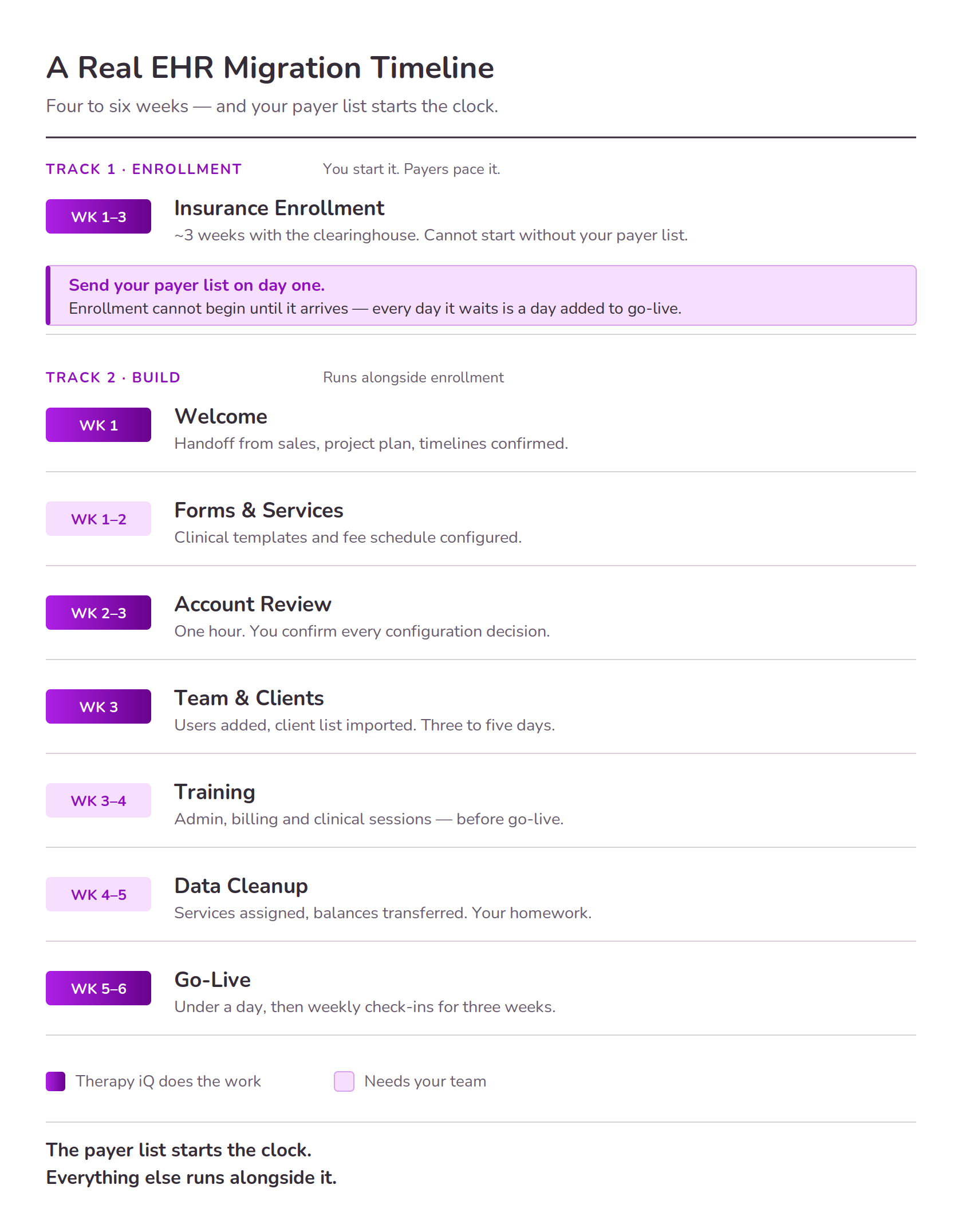
Two tracks run at once. That's the whole reason this fits in four to six weeks instead of three months.
Track one · Enrollment (starts the day your payer list arrives)
Runs about three weeks from the moment we have your payer list. Your onboarding team works the enrollment with the clearinghouse and monitors it through go-live, or until it's fully complete. You do very little here beyond sending that list promptly — you just can't skip it, and it can't be hurried once it's moving.
Track two · Build
Week 1 · Welcome. Welcome call, formal handoff from sales to onboarding, then a get-started call covering the project plan and timelines.
Weeks 1–2 · Forms and services. Your clinical forms and templates get configured; services and fees get built. This is where those four data sets earn their keep.
Week 2–3 · Account review. A one-hour call to confirm configuration decisions, with the onboarding team walking you through key settings and the things you need to be aware of. One hour, and it prevents a startling amount of downstream pain.
Week 3 · Team and clients. Users get added — under a day. Your client list is imported, which takes three to five days. Historical clinical files can come across too.
Weeks 3–4 · Training. One-hour virtual sessions split by role: admin, billing, clinical. How many depends on your onboarding plan. Do these before go-live, not after.
Weeks 4–5 · Data cleanup. Your homework, and the stage people underestimate most. Assigning services to clients, scheduling appointments, inviting clients to the portal, adding cards on file, transferring balances. A week of unglamorous work — and skipping it is how you arrive at go-live with a system that technically functions and practically doesn't.
Week 5–6 · Go-live. Under a day. You start working in the new system, with weekly check-ins through the first three weeks.
Send the payer list in week one and land the homework on time, and you're at the four-week end. Let either slip and you're at six, or past it.
The part that isn't on anyone's diagram
Your old AR doesn't disappear on go-live day.
Claims submitted before cutover pay out over the following weeks, and you need to be able to see them. So: keep read-only access to your old system while that runs down. Ask your current vendor to confirm this is available before you cancel anything — not all of them handle it the same way, and the answer sometimes depends on how you ask.
Then work that legacy AR to zero in the old system while new revenue accrues in the new one. There's no dark week. There's an overlap period where both systems are visible and only one is taking new work.
Two more scheduling notes: don't cut over mid-billing-cycle, and don't go live into an unfinished account. An on-time launch with a half-configured system and an untrained team is technically a success in roughly the way that landing a plane in a field is technically a landing.
Where migrations actually break
Not where you're worried. These three:
Missing diagnosis codes. If client profiles arrive without them, you cannot bill. Not “billing is slower” — billing is off. We've seen this stop an otherwise finished go-live dead. Treat diagnosis code validation as a hard gate, not a cleanup task.
Incorrect provider labeling. If a nurse, case manager or intern is labeled as something they aren't, you get billing errors now and audit exposure later. Role mapping between your old system, your new one, and your e-prescribing platform has to be checked deliberately. It is tedious. It is also the difference between a clean audit and a very bad quarter eighteen months from now.
Untrained go-live. Mentioned above, but worth repeating because it's the most common self-inflicted wound in the whole process. If configuration isn't done, move the date. The delay costs less than the cleanup.
About your clinicians
Worth addressing directly, because it's usually the objection behind the objection: the owner is convinced long before the staff is.
Two things help more than everything else combined.
Bring clinicians in before the decision, not after. A clinician who saw the platform and got their questions answered is a participant. A clinician informed on Monday that everything changes Friday is an obstacle, and they will be an obstacle with impressive stamina. The cost of including them early is one meeting.
Configure their accounts before they ever log in. Nobody should open a new system to a blank screen and a blinking cursor — that's not onboarding, that's a hazing ritual. Their templates, their caseload, their schedule, ready on day one. Most resistance is really anxiety about looking incompetent in front of colleagues, and a pre-built account dissolves it.
The honest summary
A well-run behavioral health EHR migration takes four to six weeks. Payer enrollment is the longest pole at about three weeks, and it does not begin until your payer list arrives — so send that first and let everything else run alongside it.
You don't have to lose a week of revenue. You do have to sequence it deliberately, keep read-only access to your old system while legacy AR runs down, and refuse to go live into an account that isn't finished.
The practices that struggle aren't the ones with complicated setups. They're the ones who picked a go-live date because it looked tidy on a calendar, then sent the payer list a fortnight later.
Therapy iQ was built by practice operators who got tired of billing delays. We've run this migration many times, including the ones that didn't go to plan — which is where most of the advice above came from.
Nate is a former Practice Owner and now CEO & Co-Founder of Therapy iQ. He writes about the operational side of running a practice — billing, migrations, and the cost of systems that don't talk to each other.